
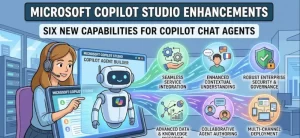
Microsoft is expanding Copilot Studio’s capabilities for building Copilot Chat agents, also known as declarative agents, with a set of enhancements scheduled to reach general availability on October 26, 2026. The update introduces six key capabilities designed to help organizations create more controlled, reliable, testable, and manageable AI agents.
The announcement is particularly relevant to businesses using Microsoft Copilot to deliver standardized answers, support internal teams, and provide information that follows organizational policies. By bringing deterministic conversational flows, connected agents, evaluations, monitoring, an integrated preview experience, and lifecycle management into the development process, Microsoft aims to give makers more tools to build and maintain these specialized AI assistants.
For organizations already developing Copilot Chat agents, the upcoming release offers an opportunity to review existing workflows and identify where the new capabilities could improve development, testing, and deployment.
What Is Changing in Microsoft Copilot Studio?
Copilot Studio is Microsoft’s platform for creating and managing AI-powered agents that support business processes and user interactions. It allows organizations to build assistants tailored to specific tasks, information sources, and business requirements.
The latest enhancement focuses on Copilot Chat agents, which are designed to provide authoritative answers and standardized content within Microsoft Copilot Chat. These agents can support use cases such as answering human resources questions, communicating company policies, and delivering content that adheres to brand guidelines or legal requirements.
Microsoft has announced six capabilities for this development experience:
- Topics: Build deterministic conversational flows to guide interactions.
- Connected agents: Delegate work to other agents where appropriate.
- Evaluations: Assess agent quality and identify opportunities for improvement.
- Monitoring: Track agent usage and understand how agents are being used.
- Native Copilot Chat preview with Activity Map: Test the experience and understand what users see.
- Agent lifecycle management: Deploy separate agent versions across development, test, and production environments.
General availability is scheduled for October 26, 2026. Microsoft describes the announcement as an informational update, so customers do not need to take immediate action.
Why These Enhancements Matter for Enterprise AI
Deploying an AI assistant in a business environment involves more than generating useful responses. Organizations also need to manage how conversations unfold, validate the quality of answers, understand usage patterns, and control changes before they reach employees or customers.
These requirements become particularly important when agents handle information governed by internal policies, brand standards, or legal obligations. An assistant that produces fluent answers is not necessarily one that consistently follows an organization’s approved processes.
The announced Copilot Studio enhancements address several of these practical concerns. They provide capabilities for structuring conversations, coordinating work between agents, assessing quality, observing usage, previewing the user experience, and managing deployment environments.
For IT teams and business application developers, the combined value lies in having more support for the full agent development process rather than focusing exclusively on initial creation.
1. Topics Enable More Predictable Conversations
Topics are designed to support deterministic conversational flows. This gives makers a way to structure interactions when a task requires a defined sequence of steps rather than an entirely open-ended exchange.
Consider an internal HR agent that answers questions about leave policies. Some questions may require only a straightforward response, while others could benefit from a guided conversation that identifies the employee’s situation before providing relevant information.
Structured flows can help developers define how particular interactions should proceed. This is useful when consistency, clarity, and adherence to an established process matter.
Organizations will still need to design and validate their flows carefully. Deterministic interactions can improve predictability, but their effectiveness depends on how well developers account for user needs, exceptions, and relevant business rules.
2. Connected Agents Support Delegation
The connected agents capability enables work to be delegated to other agents. This is relevant for organizations whose AI solutions need to address multiple business functions or handle tasks that require different areas of expertise.
For example, an organization could explore an agent architecture in which an assistant handling general employee questions delegates a specialized request to another agent responsible for a particular subject area.
Such an approach can help teams separate responsibilities and organize complex solutions into more manageable components. It may also support the development of specialized agents without requiring every capability to reside in a single assistant.
However, delegation introduces its own design considerations. Teams should establish clear responsibilities for each agent, test handoffs, and verify that delegated work produces appropriate results.
The announcement confirms support for connected agents, but it does not establish that every possible delegation pattern will be available in every configuration.
3. Evaluations Help Teams Improve Agent Quality
Evaluations are another important addition to the Copilot Chat agent development experience. They are intended to help makers improve agent quality through assessment rather than relying exclusively on informal testing.
For business users, the quality of an agent is measured by more than whether its answers sound convincing. Relevant considerations include whether responses address the question, follow instructions, reflect approved information, and behave consistently across different scenarios.
An HR agent, for example, should be assessed against representative questions about company policies. A brand-focused agent may need to be evaluated on whether its responses follow established messaging guidelines.
A structured evaluation process can help teams identify weaknesses before expanding access to an agent. It can also support repeated checks as developers refine instructions, content, or conversational flows.
The precise evaluation methods and measurement criteria should be verified against Microsoft’s detailed documentation as the feature becomes available.
4. Monitoring Provides Visibility Into Agent Usage
Monitoring will help teams track agent usage, offering a way to understand how their solutions are being used after deployment.
This matters because development testing rarely captures every situation that arises in real-world use. Employees may ask unexpected questions, approach the same task in different ways, or use an agent more frequently for particular needs.
Usage information can help teams investigate adoption patterns and identify where further review may be worthwhile. When considered alongside evaluation results and user feedback, monitoring can contribute to a more informed improvement process.
Organizations should also establish appropriate governance for any usage data they review, including access controls, privacy requirements, and internal data-handling policies.
Microsoft’s announcement identifies usage tracking as a capability but does not specify every available metric, reporting view, or alerting option. Those details should be confirmed in the official product documentation.
5. Native Copilot Chat Preview Adds an Activity Map
The new development experience includes a native Copilot Chat preview with Activity Map, allowing makers to test and understand what users see.
Testing an agent in its intended interaction environment is important because the experience during development may not always reflect how employees encounter it in practice. A preview can help makers examine responses, identify confusing interactions, and refine the experience before deployment.
The Activity Map is also intended to help developers understand the user-facing interaction. This could be particularly useful when reviewing structured flows or investigating how an agent responds during testing.
For organizations building internal assistants, this capability reinforces the importance of validating the complete interaction rather than reviewing individual responses in isolation.
Makers should consult Microsoft’s documentation for the exact Activity Map functionality, supported scenarios, and available debugging details.
6. Agent Lifecycle Management Supports Environment Separation
Agent lifecycle management is one of the most consequential additions for teams responsible for maintaining agents beyond their initial release.
The capability supports deploying separate versions of an agent across development, test, and production environments. This provides a framework for distinguishing ongoing development work from testing and live deployment.
A typical enterprise workflow might look like this:
- Development: Makers build an agent, refine its behavior, and update its configuration.
- Testing: Teams validate changes against expected scenarios before release.
- Production: An approved version is deployed for its intended audience.
Separating these environments can help organizations reduce the risk of untested changes affecting live users. It can also make development practices easier to organize across teams.
The practical benefit will depend on how organizations implement their deployment processes, permissions, approvals, and version controls. Teams should confirm the specific lifecycle management features available in Copilot Studio rather than assuming the announcement covers every requirement of a full enterprise release-management system.
What Organizations Should Do Before October 26
Microsoft says no immediate action is required. Still, organizations already building Copilot Chat agents can use the time before general availability to prepare.
A practical review should include the following steps:
- Assess existing agents: Identify agents that provide HR answers, policy guidance, approved brand content, or other standardized responses.
- Review development workflows: Determine whether structured topics, connected agents, and evaluations could address current limitations.
- Strengthen testing practices: Identify representative questions and expected responses that can help teams assess agent quality.
- Review monitoring needs: Establish which usage patterns would be useful to understand and who should be able to access that information.
- Update internal documentation: Revise development guides and training materials when the new capabilities and their availability have been confirmed.
- Prepare makers and IT teams: Communicate the release date and encourage developers to review the official documentation.
Organizations should avoid assuming that every capability will be enabled automatically in every environment or that existing agents will require migration. The announcement does not provide enough detail to establish those implementation specifics.
What This Means for Microsoft’s AI Agent Strategy
The announcement reflects a practical focus on the work surrounding AI agents: controlling interactions, coordinating specialized tasks, evaluating quality, observing usage, testing the user experience, and managing deployments.
These areas are particularly important as organizations move from experimentation toward wider business adoption. A successful enterprise agent needs to fit existing governance and development practices, not simply demonstrate that it can answer questions.
For teams using Microsoft Copilot Studio, the six capabilities offer a basis for reviewing how agents are developed and maintained. Their actual impact will depend on the functionality available at release, how well it integrates with existing workflows, and how organizations apply it to their own requirements.
What Happens Next?
The next milestone is October 26, 2026, when the enhancements are scheduled to reach general availability. Organizations should use Microsoft’s official documentation to verify feature availability, configuration requirements, and any relevant limitations as the release approaches.
For makers, developers, and IT leaders, the immediate priority is preparation rather than urgent intervention. Reviewing existing agents, documenting testing requirements, and identifying deployment needs can help teams assess the update efficiently once the capabilities become available.
The broader question will be how effectively organizations use these tools to build agents that are not only useful, but also consistent, measurable, and manageable throughout their lifecycle.
Extra posts:
 Microsoft 365 Copilot Chat Skills: Features, Admin Controls, and October 2026 Rollout
  SharePoint OTP Retirement Is Coming: Microsoft Entra B2B Migration Starts October 2026
  The Difference Between Declarative Agents and Autonomous Agents in Copilot Studio
  Copilot Studio vs Azure AI Agents: What Should You Use?
  Power BI Reports Are Coming to Microsoft Copilot Notebooks
  Copilot Studio vs. Power Virtual Agents What’s Changed?