
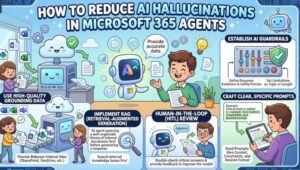
An AI agent can produce a polished, confident answer and still get the underlying fact wrong. In a Microsoft 365 environment, that can mean inventing a policy requirement, citing an outdated procedure, misreading a project document, or answering a question that should have triggered a search of enterprise data.
The solution isn’t simply to tell the model, “Don’t hallucinate.” Reliable Microsoft 365 agents need a controlled path from user question → trusted knowledge → retrieval → grounded response → validation.
Microsoft provides several mechanisms to build that path, including knowledge sources, scoped retrieval, agent instructions, citations, Copilot connectors, and structured evaluation. Used together, they can significantly reduce unsupported answers and make agent behavior easier to test and govern.
Why Microsoft 365 Agents Hallucinate
Large language models generate responses rather than querying a traditional database for every statement. If an agent doesn’t have access to the information it needs—or retrieves weak or irrelevant information—it may fill the gap with a plausible answer.
That becomes particularly risky in enterprise environments because organizational information is often:
- Spread across SharePoint, OneDrive, Teams, Outlook, and line-of-business systems
- Updated frequently
- Subject to permissions and sensitivity controls
- Written in inconsistent formats
- Dependent on business-specific terminology
Consider an HR agent answering, “How many days of parental leave do employees receive?”
If the answer isn’t grounded in the current HR policy, the model may produce an answer based on general knowledge or outdated context. The response can sound completely reasonable while being wrong for that organization.
Reducing hallucinations therefore starts with a simple principle: don’t make the model guess when authoritative enterprise information is available.
1. Ground the Agent in Authoritative Knowledge Sources
Grounding is the first major control.
Microsoft 365 agents can use sources such as SharePoint, OneDrive, Teams data, websites, embedded files, Microsoft 365 Copilot connectors, and other enterprise sources. These sources give the agent information it can retrieve when responding to a user’s request.
The important distinction is between having access to knowledge and having the right knowledge.
Adding hundreds of loosely related documents doesn’t automatically make an agent more accurate. It can create more opportunities for retrieval to surface obsolete or conflicting information.
For each agent, define an explicit source hierarchy:
- Identify the systems that contain the authoritative answer.
- Remove duplicate or obsolete content where possible.
- Scope retrieval to relevant sites, libraries, files, or connectors.
- Establish ownership for keeping the content current.
- Test questions against those sources before deployment.
For example, a procurement agent should preferentially retrieve the current procurement policy and approved supplier documentation rather than relying on general web information.
Microsoft’s Agent Builder can prioritize specified knowledge sources for knowledge-based questions. For stricter control over grounding, Microsoft recommends using Copilot Studio because Agent Builder cannot completely block general AI knowledge from responses.
2. Control When the Agent Is Allowed to Answer
One of the most effective hallucination controls is also one of the simplest: give the agent permission to say that it doesn’t know.
In Copilot Studio, the Allow ungrounded responses setting determines whether an agent can answer using the model’s general knowledge when it cannot produce a grounded answer.
When ungrounded responses are disabled, the agent can return a knowledge-based answer only when it meets the grounding requirements, including citation behavior. Microsoft notes that this can occasionally result in the agent withholding a correct answer if a citation isn’t generated properly.
For enterprise workflows, that’s often a useful trade-off.
A response such as:
“I couldn’t find that information in the approved HR policies.”
is much safer than:
“Employees are entitled to 30 days of leave.”
when the agent has no evidence for the second statement.
Your fallback behavior should be deliberate. Depending on the use case, the agent can:
- Ask the user to clarify the question.
- Point the user to an authoritative source.
- Escalate to a human team.
- Explain that no approved information was found.
- Request additional context before continuing.
Abstention isn’t an agent failure. In high-stakes workflows, knowing when not to answer is part of correctness.
3. Write Agent Instructions Around Evidence, Not Just Tone
Instructions are another major control point.
Microsoft describes agent instructions as the central directions that influence which resources the agent calls, how it fills tool inputs, and how it generates responses. Instructions should therefore describe the agent’s actual capabilities and configured knowledge sources.
Weak instruction:
Answer questions about company policies accurately.
Better instruction:
For policy questions, retrieve information from the configured HR policy knowledge source. Base factual claims on retrieved content. If the required policy information cannot be found, state that the information was not found and do not infer or invent a policy requirement. Include source citations where available.
The second instruction establishes an operational behavior.
Good instructions should define:
- Which source to use
- When to retrieve information
- What to do when retrieval returns nothing
- How to handle conflicting information
- When to ask a clarification question
- When to escalate
- How citations should be presented
Microsoft also recommends keeping instructions grounded in resources actually configured for the agent. An instruction cannot make an agent search a knowledge source that hasn’t been added to the agent.
4. Use Citations as a Verification Layer
Citations aren’t just a user-experience feature. They can become part of your reliability strategy.
A citation gives the user a way to inspect the source behind an answer. It also creates a useful development requirement: if the agent can’t identify supporting evidence, should it really make the claim?
Microsoft’s Copilot Studio documentation specifically recommends adding citation instructions when grounded answers require citations. It also warns that rigid output instructions—such as forcing a JSON-only response—can interfere with citation markers.
For enterprise agents, consider instructions such as:
Include an in-text citation for factual statements based on enterprise knowledge.
Then test whether citations actually point to the intended documents.
This matters particularly when using custom data. Microsoft recommends including fields such as ContentLocation and Title so the model has the information needed to cite custom sources.
The practical rule is straightforward:
No evidence, no confident claim.
5. Scope External and Connector-Based Knowledge
Many enterprise agents need information outside Microsoft 365. That’s where Copilot connectors become useful.
Copilot connectors can bring knowledge from external systems into Microsoft 365 so agents can use sources such as service-management systems, repositories, or other enterprise applications. Microsoft notes that connector-based grounding respects source-level permissions, helping ensure users only retrieve content they are authorized to access.
But more data isn’t always better.
If an agent can search everything, retrieval can become harder to control. Scope connector data to the information relevant to the agent’s job.
For example:
IT support agent
- Approved troubleshooting articles
- Service tickets
- Internal IT policies
- Product documentation
Sales agent
- Approved product information
- Pricing documents
- CRM data
- Sales playbooks
Avoid giving both agents unrestricted access to an enormous enterprise corpus simply because the data is available.
The goal is relevant grounding, not maximum grounding.
6. Test for Hallucinations Before You Publish
You can’t solve hallucinations with configuration alone. You need repeatable tests.
Create a test set containing questions that represent real user behavior, including questions where the correct response should be an answer and questions where the correct response should be an abstention.
For example:
| Test scenario | Expected behavior |
|---|---|
| “What is our current expense limit?” | Retrieve the approved policy and cite it |
| “What was the previous expense limit?” | Clearly distinguish historical information |
| “What is the policy for a situation not covered?” | Don’t invent a policy |
| Ambiguous policy question | Ask for clarification |
| Question outside the agent’s scope | Explain the limitation |
Microsoft’s agent evaluation guidance recommends building foundational test sets, establishing a baseline, expanding the test suite, and continuing evaluation throughout the agent lifecycle.
Copilot Studio supports different evaluation methods, including general quality, similarity, exact or keyword matching, and tool-use testing, depending on the evaluation experience and configuration.
This lets teams move beyond “I tried a few prompts and it seemed fine.”
Instead, you can ask:
- Did the agent retrieve the correct source?
- Did it cite the source?
- Did it answer only what the evidence supports?
- Did it abstain when information was missing?
- Did a configuration change make existing scenarios worse?
That last question is particularly important. Agent behavior can change as instructions, knowledge sources, tools, and content change.
Build a Hallucination-Resistant Agent Architecture
A practical Microsoft 365 agent architecture should treat hallucination prevention as a layered system:
1. Curated knowledge
Keep authoritative content current and remove obvious duplication or obsolete material.
2. Scoped retrieval
Give the agent access to the sources that actually matter for its task.
3. Explicit instructions
Tell the agent how to retrieve, reason over, cite, and handle missing information.
4. Controlled fallback behavior
Allow the agent to abstain rather than manufacture an answer.
5. Citations and provenance
Make supporting evidence visible and inspectable.
6. Repeatable evaluation
Run test cases against the agent before and after changes.
This approach is more robust than trying to solve hallucinations with a single prompt.
A Practical Starting Checklist
If you’re responsible for a Microsoft 365 agent today, start with these five checks:
- Audit the knowledge sources: Can you identify the authoritative source for every important answer?
- Reduce the retrieval scope: Does the agent have access to unnecessary or conflicting content?
- Strengthen the instructions: Does the agent know what to do when evidence is missing?
- Require useful citations: Can users verify important factual claims?
- Create an evaluation set: Do you have repeatable tests for both correct answers and appropriate abstention?
Then rerun the tests whenever you change the agent’s instructions, knowledge, tools, or retrieval configuration.
Make Grounding a Design Requirement, Not a Prompt Trick
AI hallucinations are not something you eliminate with one magic instruction. They are a system-design problem.
For Microsoft 365 agents, the strongest approach is to reduce the opportunities for unsupported generation: give the agent authoritative sources, constrain how it retrieves information, make evidence visible, define safe fallback behavior, and continuously test the result.
Microsoft’s own guidance increasingly treats agent evaluation as an ongoing lifecycle activity rather than a one-time pre-release check.
The next logical step is to take one production agent and build a small evaluation set around its highest-risk questions. Measure groundedness, citation behavior, correct retrieval, and abstention before changing anything. Once you have that baseline, you can improve the agent systematically instead of guessing which prompt change made it better.
Extra posts:
 Microsoft 365 Copilot & Agents Fundamentals
  10 Best Practices for Designing Effective Microsoft 365 Agents
  Microsoft 365 Agents Connectors: A Practical Guide
  Governance of AI Agents with Microsoft Entra & Agent 365
  Microsoft 365 Adds New Copilot Governance Control for Advanced Agents and Plugins
  Microsoft Launches Agent 365 to Bring Control, Security, and Visibility to the Age of AI Agents