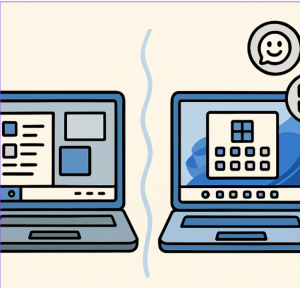
Modern, sleek interface: Rounded corners, pastel accents, and fluid animations give Windows 11 a fresh, Mac-like aesthetic—far more refined than Windows 10’s traditional layout.
Centered Start Menu & Taskbar: By default, everything sits at the center—but you can revert to the classic left alignment if preferred.
Simplified Start Menu: Live Tiles are gone. Instead, you get a clean grid of static, pinned apps and “Recommended” content.
2. Smarter Multitasking & Productivity
Snap Layouts & Groups: Instead of manually snapping windows, you now have preset layouts and groups you can recall with a hover over the taskbar.
Virtual Desktops: Improved animations and personalization—assign different backgrounds to desktops for work, gaming, etc.
File Explorer Tabs & Smart Suggestions: You can manage multiple folders in one window, and File Explorer now surfaces intelligent recommendations based on your usage.
Enhanced Snipping Tool: Supports text extraction, redaction, and even screen recording.
3. Performance, Gaming, & Hardware Improvements
Gaming Boosts: Windows 11 introduces Auto HDR and leverages DirectStorage to accelerate game loading, alongside full DirectX 12 support.
Modernized Microsoft Store: Revamped design with support for a broader range of apps including Android apps via the Amazon Appstore.
4. Security Enhancements
TPM 2.0 & Secure Boot: Windows 11 requires TPM 2.0 and enhanced Secure Boot, significantly raising the bar for system security.
Windows Hello, Passkeys & Smart App Control: Biometric sign-in is more robust, with a new passkey system for seamless app login. Smart App Control ensures only trusted apps run.
5. Built-in AI & Productivity Tools
Microsoft Copilot & AI Recommendations: Intelligent suggestions surface in File Explorer, Start Menu, and taskbar. Copilot helps with content creation, task automation, and more.
Phone Link for iPhone: Windows 11 supports connecting your iPhone to your PC—call, text, and get notifications without picking up your phone.
6. Better Touch, Voice & Accessibility Features
Adaptive Touch Interface: Windows 11 eliminates tablet mode. Instead, it adjusts UI based on usage—bigger targets and split views for touchscreens.
Voice Typing & Custom Keyboards: Improved voice-to-text capabilities and customizable touch keyboard themes and sizes.
Accessibility Enhancements: Includes better Narrator with natural speech, customizable contrast themes, and improved color control.
7. Support, Stability, and the Road Ahead
End of Windows 10 Support: Windows 10 support ends October 14, 2025. After that, it will no longer receive security patches.
Widespread Adoption: Windows 11 has now overtaken Windows 10 in desktop market share.
Ongoing Enhancements:
PowerToys Updates: Scheduled theme switching and shortcut conflict detection are being added.
Improved Bluetooth Audio: Windows 11 now supports stereo LE Audio—better gaming and call quality.
Visual Tweaks: The BSOD is now black, with clearer info and Quick Machine Recovery to help recover from crashes.
24H2 Feature Drop: Adds Wi-Fi 7 support, live captions with translation, proactive security, and a scrollable Quick Settings list.

 Azure Support Plans Compared: Choosing the Right One for Your Organization
  How to Move the Start Menu to the Left in Windows 11 (Like Windows 10 Style)
  Setting Up Windows Hello for Faster Logins in Windows 11
  Windows 11 built in Gadgets
  Using Widgets Effectively in Windows 11
  Telemetry in Windows 11: What It Is and Why It Matters for Your PC