
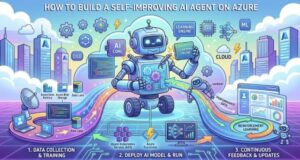
AI agents are quickly moving beyond simple chatbots.
A traditional chatbot answers a question. A more advanced AI agent can reason about a task, use tools, retrieve information, interact with APIs, and complete multiple steps on behalf of a user.
But there is another important step in the evolution of AI agents: self-improvement.
A self-improving AI agent can evaluate its own performance, learn from previous outcomes, remember useful experiences, identify better strategies, and use those lessons when solving future tasks.
This does not necessarily mean allowing an AI model to rewrite its own underlying code or retrain itself continuously. In a production environment, that would create significant reliability and security challenges.
Instead, a practical self-improving agent uses a controlled feedback loop:
Observe → Plan → Act → Evaluate → Learn → Test → Improve → Repeat
Microsoft Azure provides many of the building blocks needed to implement this architecture, including Microsoft Foundry, Azure OpenAI models, Azure AI Search, Azure Functions, Azure Cosmos DB or PostgreSQL, Azure Monitor, Application Insights, Microsoft Entra ID, Key Vault, and CI/CD services.
This article explains how to design and implement such an agent from both an architectural and technical perspective.
What Is a Self-Improving AI Agent?
A self-improving AI agent is an agent that can use feedback from previous tasks to improve how it handles future tasks.
A basic AI application might work like this:
User
 ↓
LLM
 ↓
Response
An AI agent adds tools and reasoning:
User
 ↓
Agent
 ↓
Plan
 ↓
Tools
 ↓
Observe Results
 ↓
Response
A self-improving agent adds another layer:
User
 ↓
Agent
 ↓
Plan
 ↓
Tools
 ↓
Result
 ↓
Evaluator
 ↓
Feedback
 ↓
Memory / Experience
 ↓
Improved Strategy
 ↓
Future Task
The important difference is that the system doesn’t treat every task as an isolated event.
It learns from what happened previously.
For example, imagine an AI customer-support agent that incorrectly answers a refund question because it used an outdated policy document.
A basic agent simply returns the incorrect answer.
A self-improving system can detect the problem and record a lesson:
Failure:
Used outdated refund policy.

Root cause:
Knowledge retrieval returned an old document.

Lesson:
Refund questions must use the latest approved policy.

Improvement:
Prioritize current policy documents and verify effective dates.
The next time a similar request arrives, that lesson can influence the agent’s behavior.
That is the foundation of self-improvement.
Why Azure Is a Good Platform for Self-Improving Agents
Building an intelligent agent requires more than an LLM.
You need a model, tools, memory, retrieval, security, evaluation, monitoring, and deployment infrastructure.
Azure provides services for each of these requirements.
A possible architecture looks like this:
                         ┌──────────────────┐
                         │      User        │
                         └────────┬─────────┘
                                  │
                                  ▼
                     ┌────────────────────────┐
                     │ Microsoft Foundry      │
                     │       Agent             │
                     └────────────┬───────────┘
                                  │
              ┌───────────────────┼───────────────────┐
              │                   │                   │
              ▼                   ▼                   ▼
       ┌────────────┐      ┌─────────────┐     ┌──────────────┐
       │ Azure      │      │ Azure AI    │     │ Azure        │
       │ OpenAI     │      │ Search      │     │ Functions    │
       └────────────┘      └─────────────┘     └──────────────┘
              │                   │                   │
              └───────────────────┼───────────────────┘
                                  ▼
                       ┌────────────────────┐
                       │     Evaluator      │
                       │ Quality + Safety   │
                       └─────────┬──────────┘
                                 │
                                 ▼
                       ┌────────────────────┐
                       │ Memory / Experience│
                       │       Store        │
                       └─────────┬──────────┘
                                 │
                                 ▼
                       ┌────────────────────┐
                       │ Strategy Manager   │
                       └─────────┬──────────┘
                                 │
                                 ▼
                       ┌────────────────────┐
                       │ Azure Monitor +    │
                       │ Application        │
                       │ Insights           │
                       └────────────────────┘
Microsoft Foundry Agent Service provides managed infrastructure for building and operating agents, including models, instructions, tools, conversations, and agent lifecycle capabilities.
The broader Azure ecosystem then provides the supporting infrastructure.
1. Define What “Improvement” Means
Before writing any code, define what improvement means for your specific agent.
This is often overlooked.
An agent cannot improve if you don’t know how to measure success.
For a customer-service agent, useful metrics might include:
- Resolution rate
- Customer satisfaction
- Accuracy
- Escalation rate
- Response time
- Groundedness
- Safety
For a coding agent:
- Tests passed
- Bugs introduced
- Security issues
- Code quality
- Execution time
- Cost
For a research agent:
- Source quality
- Factual accuracy
- Completeness
- Groundedness
- Citation quality
- Response relevance
You can combine these metrics into an overall score.
For example:
Overall Score =
    35% Task Success
  + 25% Accuracy
  + 20% Groundedness
  + 10% Safety
  + 10% Efficiency
The weights should reflect the business requirements of the application.
For a medical, financial, or security-sensitive system, safety and accuracy may need much higher weights than speed.
2. Build the Agent Core With Microsoft Foundry
The agent needs a model, instructions, tools, and a defined objective.
Microsoft Foundry can be used as the central agent platform.
The agent’s instructions might look something like:
You are an enterprise customer-support agent.

Your objectives are:

1. Resolve customer requests accurately.
2. Use approved company knowledge.
3. Verify information that may have changed.
4. Never invent policies or product information.
5. Escalate when confidence is low.
6. Use available tools when required.
7. Learn from evaluated interactions.

Before responding:
- Understand the customer's intent.
- Retrieve relevant information.
- Verify important claims.
- Complete required tool calls.
- Evaluate whether the response satisfies the request.
These instructions establish the agent’s behavior.
However, the instructions themselves are not enough to make the system self-improving.
We need memory, evaluation, and an improvement mechanism.
3. Give the Agent Tools
An AI agent becomes significantly more useful when it can interact with external systems.
On Azure, tools can be implemented using services such as Azure Functions, Container Apps, APIs, or MCP-compatible services.
For example, a customer-support agent could have tools such as:
get_customer()
get_order()
check_inventory()
search_policy()
calculate_refund()
create_support_ticket()
send_notification()
A tool might return structured information:
{
  "order_id": "A12345",
  "status": "shipped",
  "delivery_date": "2026-08-29"
}
Structured tool responses are preferable to returning large amounts of unstructured text.
They make it easier for the agent to reason about the result and easier for the evaluator to determine whether the tool was used correctly.
4. Use Azure Functions for Custom Agent Tools
Azure Functions are particularly useful for lightweight, event-driven operations.
A simplified Python tool could look like:
def get_customer_order(order_id):
    order = database.get_order(order_id)

    return {
        "order_id": order.id,
        "status": order.status,
        "delivery_date": order.delivery_date
    }
In production, the function should also perform authentication, authorization, input validation, logging, and error handling.
For example:
Agent
 ↓
Tool request
 ↓
Azure Function
 ↓
Validate input
 ↓
Check identity
 ↓
Check permissions
 ↓
Call backend API
 ↓
Return structured result
The agent should never receive more permissions than it needs.
This follows the principle of least privilege.
5. Add Knowledge Retrieval With Azure AI Search
Most enterprise agents need access to company information.
That could include:
- Product documentation
- Internal policies
- Technical manuals
- FAQs
- Customer documentation
- HR policies
- Knowledge articles
- Procedures
Instead of putting all this information inside the prompt, use retrieval-augmented generation, or RAG.
The architecture becomes:
User Question
      ↓
Agent
      ↓
Azure AI Search
      ↓
Relevant Documents
      ↓
LLM
      ↓
Grounded Response
Azure AI Search can provide keyword, semantic, vector, and hybrid retrieval capabilities.
A self-improving agent can also evaluate its retrieval strategy.
For example:
Strategy A
Top 3 documents
Score = 0.71

Strategy B
Hybrid search + reranking
Score = 0.89
If Strategy B consistently produces better results, the strategy manager can recommend it for future tasks.
This is an important example of self-improvement that does not require retraining the foundation model.
6. Add Short-Term and Long-Term Memory
Memory allows the agent to use information from previous interactions.
There are two useful categories.
Short-Term Memory
Short-term memory contains information about the current task:
- User request
- Conversation history
- Tool calls
- Tool responses
- Intermediate results
- Current plan
Long-Term Memory
Long-term memory contains information that may be useful later:
- Successful strategies
- Previous failures
- Lessons learned
- User preferences
- Frequently used tools
- Important facts
Microsoft Foundry provides memory capabilities for hosted agents, while Azure services such as Azure AI Search, Cosmos DB, PostgreSQL, and Blob Storage can also be used to build custom memory architectures.
A memory record could look like:
{
  "task_type": "refund_request",
  "strategy": "retrieve_policy_then_verify_order",
  "result": "success",
  "score": 0.94,
  "lesson": "Always verify refund eligibility against the current policy.",
  "timestamp": "2026-08-27T10:30:00Z"
}
The important thing is not to save everything.
Instead, save information that is likely to improve future decisions.
7. Create an Experience Store
A self-improving agent needs somewhere to store experiences.
One possible Azure architecture is:
Experience Metadata
        ↓
Azure Cosmos DB / PostgreSQL

Semantic Experiences
        ↓
Azure AI Search

Large Artifacts
        ↓
Azure Blob Storage
For example:
{
  "task": "research_product_pricing",
  "strategy": "live_api_verification",
  "tools_used": [
    "search",
    "pricing_api"
  ],
  "score": 0.93,
  "success": true,
  "lesson": "Pricing information should always be verified against the live pricing API."
}
Over time, this becomes a knowledge base of what works and what doesn’t.
8. Build an Evaluator
The evaluator is arguably the most important part of the entire system.
Without an evaluator, you cannot reliably determine whether the agent is improving.
The evaluator can combine several signals:
Automated Tests
       +
LLM Evaluation
       +
Human Feedback
       +
Business Metrics
       =
Overall Evaluation
Microsoft Foundry provides evaluation capabilities for assessing agent and model quality and safety.
For example, an evaluator might check:
Task Success
Accuracy
Groundedness
Relevance
Safety
Tool Usage
Efficiency
A simplified evaluator might look like:
def evaluate_agent_run(task, response, tool_calls):

    score = 0

    if task_completed(task, response):
        score += 0.40

    if response_is_grounded(response):
        score += 0.20

    if tools_used_correctly(tool_calls):
        score += 0.20

    if response_is_safe(response):
        score += 0.20

    return score
In production, these functions would be significantly more sophisticated.
9. Use Both Deterministic and AI-Based Evaluation
One common mistake is asking another LLM:
“Was this answer good?”
and using that result as the only evaluation.
That is risky.
A stronger architecture combines deterministic checks and model-based evaluation.
For example, for a coding agent:
Unit Tests
Security Scanner
Static Analysis
LLM Code Review
Human Review
For a customer-support agent:
Policy Validation
Resolution Check
Groundedness Evaluation
LLM Quality Evaluation
Customer Feedback
The more objective signals you have, the more reliable the improvement process becomes.
10. Turn Failures Into Lessons
Now the system can start learning.
Suppose an agent receives a low evaluation score.
The system can perform root-cause analysis.
Instead of storing:
Result = Badstore:
{
  "failure": "Incorrect refund amount.",
  "root_cause": "Agent used an outdated pricing document.",
  "lesson": "Refund calculations require current pricing data.",
  "recommended_action": "Call pricing API before calculating refund."
}
This creates a reusable learning artifact.
The next similar task can retrieve that lesson.
The resulting loop is:
Failure
   ↓
Root Cause
   ↓
Lesson
   ↓
Memory
   ↓
Future Task
   ↓
Better Strategy
This is one of the most practical forms of self-improvement.
11. Add Reflection
Another technique is agent reflection.
After completing a task, the agent can review its own work.
For example:
Did I answer the actual question?

Did I use the correct tools?

Did I rely on outdated information?

Did I satisfy all requirements?

Did I make unsupported assumptions?

What could I have done differently?
The result can be passed to the evaluator.
However, reflection needs limits.
Don’t allow the agent to reflect indefinitely.
Set limits for:
- Maximum iterations
- Maximum tool calls
- Token usage
- Execution time
- Maximum cost
Otherwise, the system can become expensive without necessarily becoming better.
12. Build a Strategy Manager
The agent should not randomly change its behavior.
Instead, create a strategy registry.
For example:
{
  "strategy_id": "research_v3",
  "name": "Verified Research Workflow",
  "steps": [
    "classify_question",
    "search_sources",
    "rank_sources",
    "cross_check_claims",
    "generate_answer"
  ],
  "average_score": 0.91,
  "sample_size": 125,
  "status": "production"
}
You might have:
research_v1 → 0.74
research_v2 → 0.83
research_v3 → 0.91
The system now has evidence that version 3 performs better.
This is much safer than allowing the agent to rewrite its own prompt whenever it encounters a failure.
13. Create a Controlled Improvement Pipeline
The agent should be able to propose improvements, but the production system should decide whether those improvements are accepted.
A strong architecture is:
Production Agent
       ↓
Observe Failure
       ↓
Analyze Failure
       ↓
Generate Candidate Strategy
       ↓
Run Evaluation Dataset
       ↓
Run Regression Tests
       ↓
Security Checks
       ↓
Compare With Current Version
       ↓
Human Approval
       ↓
Deploy
This is essentially software engineering applied to AI behavior.
A candidate improvement should only become a production strategy if it demonstrates measurable improvement.
14. Use Evaluation Datasets
Create a representative dataset of real-world tasks.
For example:
{
  "input": "Can I get a refund for this order?",
  "expected_behavior": [
    "check order",
    "retrieve current policy",
    "verify eligibility"
  ]
}
Run every new agent version against the dataset.
Suppose you get:
                     v1       v2

Task Success         78%      91%
Groundedness         82%      94%
Safety               97%      98%
Average Latency      4.1s     4.6s
Cost per Task        $0.04    $0.06
Is v2 better?
Probably—but the answer depends on your business requirements.
Maybe the additional cost is acceptable because the success rate increased substantially.
This is why evaluation should consider quality, latency, cost, and safety together.
15. Monitor the Agent With Azure Monitor and Application Insights
A self-improving system needs strong observability.
Microsoft Foundry integrates with Azure Monitor and Application Insights for agent tracing and monitoring.
A trace might contain:
Trace ID: 7f81

Agent
 ├── Intent classification       180 ms
 ├── Memory retrieval             75 ms
 ├── Azure AI Search             320 ms
 ├── LLM call                   1.8 sec
 ├── Tool: get_order             240 ms
 ├── Final response             1.1 sec
 └── Evaluation                  650 ms

Total:                          4.36 sec

Quality Score:                  0.92
Tokens:                          3,842
This allows engineering teams to identify:
- Slow tool calls
- Expensive model calls
- Failed requests
- Poor retrieval
- Excessive token usage
- Agent loops
- Quality regressions
Observability is not just about debugging.
It becomes part of the learning system.
16. Turn Production Traces Into Evaluation Data
One powerful approach is to use real production interactions to improve the evaluation dataset.
The lifecycle becomes:
Real User Interaction
        ↓
Agent Trace
        ↓
Evaluation
        ↓
Identify Failure
        ↓
Curate Dataset
        ↓
Test New Agent Version
This is important because synthetic tests alone may not represent the problems users encounter in production.
For example, you might discover that users frequently ask questions that your original test dataset never included.
Those interactions can become new evaluation cases.
Over time, your evaluation dataset becomes more representative.
17. Implement the Core Agent Loop
A simplified implementation might look like this:
def run_agent(task):

    memories = retrieve_relevant_memories(task)

    strategy = select_best_strategy(
        task=task,
        memories=memories
    )

    result = execute_agent(
        task=task,
        strategy=strategy
    )

    evaluation = evaluate(
        task=task,
        result=result
    )

    store_experience(
        task=task,
        strategy=strategy,
        result=result,
        evaluation=evaluation
    )

    if evaluation.score < QUALITY_THRESHOLD:

        lesson = analyze_failure(
            task=task,
            result=result,
            evaluation=evaluation
        )

        store_lesson(lesson)

        candidate = propose_strategy_update(
            strategy=strategy,
            lesson=lesson
        )

        if passes_regression_tests(candidate):
            submit_for_approval(candidate)

    return result
Notice something important:
The agent does not automatically deploy the new strategy.
It proposes the improvement.
The evaluation and governance process determines whether the improvement is accepted.
18. Azure CI/CD for Agent Improvements
Once you have candidate strategies, you can integrate the process with GitHub Actions or Azure DevOps.
A deployment pipeline could look like:
Developer / Agent Proposal
          ↓
Git Repository
          ↓
Automated Tests
          ↓
Evaluation Dataset
          ↓
Security Checks
          ↓
Performance Tests
          ↓
Approval
          ↓
Staging
          ↓
Production
You can version:
- Agent instructions
- Tool definitions
- Retrieval configuration
- Evaluation criteria
- Strategy definitions
- Application code
- Infrastructure configuration
This makes AI development much closer to conventional software engineering.
19. Keep Every Version
Versioning is essential.
Suppose the agent improves from:
Agent v1.0 → 0.76
Agent v1.1 → 0.84
Agent v1.2 → 0.89
Agent v1.3 → 0.81
You need to be able to roll back from v1.3 to v1.2.
Every change should have:
Version
Date
Reason for change
Previous performance
New performance
Evaluation dataset
Approver
Deployment status
This creates an audit trail.
It also makes debugging much easier.
20. Add Azure Security and Identity
Self-improving agents introduce another challenge: permissions.
An agent with access to databases, APIs, customer records, and deployment systems can potentially cause significant damage if its permissions are too broad.
Use Microsoft Entra ID for identity and Azure RBAC for access control.
Use Azure Key Vault for secrets.
Prefer managed identities over hard-coded credentials.
The architecture should look like:
Agent
 ↓
Managed Identity
 ↓
Entra ID
 ↓
RBAC
 ↓
Authorized Tool
 ↓
Backend System
Do not put API keys, passwords, or connection strings inside prompts.
Also avoid sending unnecessary sensitive information to the model or telemetry system.
21. Separate Experimentation From Production
One of the strongest design principles for self-improving AI is environment separation.
Use:
Development
     ↓
Experimentation
     ↓
Evaluation
     ↓
Staging
     ↓
Production
The agent can experiment in a controlled environment.
It should not be able to modify production systems simply because it believes the modification is beneficial.
For example, allow an agent to experiment with a new retrieval strategy against a test dataset.
Do not allow it to automatically change the production retrieval configuration without approval.
22. Add Guardrails Around Agent Actions
Guardrails should exist at multiple levels.
Input Guardrails
Detect:
- Malicious instructions
- Prompt injection
- Invalid requests
- Sensitive information
Tool Guardrails
Control:
- Which tools can be called
- Which parameters are allowed
- Maximum number of calls
- Permissions
Output Guardrails
Check:
- Accuracy
- Safety
- Sensitive information
- Policy violations
- Unsupported claims
Operational Guardrails
Control:
- Budget
- Latency
- Number of iterations
- Deployment permissions
A useful principle is:
The more consequential the action, the stronger the approval requirement.
Reading an FAQ can be fully automated.
Deleting a database record should not be.
23. Use Human Feedback as Another Learning Signal
Not every quality measurement can be automated.
Users can provide extremely valuable signals.
For example:
👍 Helpful
👎 Not helpful
You can also ask:
Was your issue resolved?

Yes / No
For enterprise applications, human reviewers can provide detailed labels:
Accuracy: 4/5
Groundedness: 5/5
Relevance: 3/5
Safety: 5/5
These signals can be added to the evaluation pipeline.
Over time, the agent learns which types of responses produce better outcomes.
24. Measure Cost as Well as Quality
An agent can become better but also significantly more expensive.
Suppose:
Version A

Accuracy: 88%
Cost: $0.03/request
Latency: 2.5 seconds

Version B

Accuracy: 94%
Cost: $0.18/request
Latency: 9 seconds
Whether B is better depends on the business.
For a high-value financial analysis, the additional cost might be completely reasonable.
For millions of simple customer requests, it may not be.
A mature self-improving system should optimize multiple objectives:
Quality
+
Safety
+
Latency
+
Cost
+
Reliability
25. A Practical Azure Technology Stack
A production architecture could use the following services:
| Layer | Azure Technology |
|---|---|
| Agent Runtime | Microsoft Foundry Agent Service |
| Foundation Models | Azure OpenAI / Foundry model catalog |
| Retrieval | Azure AI Search |
| Memory | Foundry Memory or Azure data services |
| Custom Tools | Azure Functions |
| Containers | Azure Container Apps |
| API Layer | Azure API Management |
| Structured Data | Azure Cosmos DB / PostgreSQL |
| Large Files | Azure Blob Storage |
| Identity | Microsoft Entra ID |
| Secrets | Azure Key Vault |
| Monitoring | Azure Monitor |
| Tracing | Application Insights |
| Evaluation | Microsoft Foundry Evaluations |
| CI/CD | GitHub Actions / Azure DevOps |
| Infrastructure | Bicep / Terraform |
You do not necessarily need every service.
For a small prototype, a much simpler architecture may be enough:
Microsoft Foundry
       +
Azure AI Search
       +
Azure Functions
       +
Application Insights
As the system grows, additional services can be introduced.
26. Example End-to-End Workflow
Let’s put everything together with a customer-support example.
A user asks:
“Can I return this laptop and get a full refund?”
The agent begins by retrieving relevant memory.
Memory:
Refund requests should use the latest return policy.
It then searches Azure AI Search.
Policy:
Laptop returns allowed within 30 days.
The agent calls an Azure Function:
get_order(order_id)The result is:
Purchase date: 18 days ago
Product: Laptop
Status: Delivered
The agent determines that the customer is eligible.
It produces a response.
The evaluator checks:
Policy correctness: 1.0
Order verification: 1.0
Groundedness: 0.96
Task success: 1.0
Safety: 1.0
Overall:
Score = 0.98The experience is stored:
{
  "task_type": "refund_request",
  "strategy": "policy_plus_order_verification",
  "score": 0.98,
  "success": true
}
Now imagine another interaction fails because the agent used an outdated policy.
The system identifies the root cause.
It creates a new lesson:
Always verify policy effective date before making refund decisions.The strategy manager proposes:
Old:
Search policy → Answer

New:
Search policy → Check effective date → Verify order → Answer
The new strategy is tested against the evaluation dataset.
If it performs better, it can be approved and deployed.
That is a real self-improvement loop.
27. What Not to Do
There are several approaches that sound attractive but create problems.
Don’t Let the Agent Rewrite Production Code Freely
This makes the system difficult to control and audit.
Don’t Store Every Conversation Forever
Uncontrolled memory becomes noisy, expensive, and potentially risky.
Don’t Use Only LLM-Based Evaluation
Combine AI evaluation with deterministic checks, business metrics, and human feedback.
Don’t Optimize Only for Accuracy
Consider cost, latency, safety, reliability, and user satisfaction.
Don’t Skip Versioning
Every agent behavior change should be traceable and reversible.
Don’t Give the Agent Excessive Permissions
Use least privilege and explicit authorization.
Don’t Assume More Autonomy Means More Intelligence
A highly autonomous agent that makes poor decisions is worse than a slightly less autonomous agent that is reliable.
The Architecture in One Picture
The entire concept can be summarized as:
                  ┌──────────────────┐
                  │       USER       │
                  └────────┬─────────┘
                           │
                           ▼
                ┌─────────────────────┐
                │   FOUNDRY AGENT     │
                │                     │
                │ Plan + Reason + Act │
                └──────────┬──────────┘
                           │
             ┌─────────────┼──────────────┐
             ▼             ▼              ▼
        ┌─────────┐  ┌────────────┐  ┌───────────┐
        │ Memory  │  │ AI Search  │  │   Tools   │
        └────┬────┘  └─────┬──────┘  └─────┬─────┘
             │             │               │
             └─────────────┼───────────────┘
                           ▼
                    ┌──────────────┐
                    │    RESULT    │
                    └──────┬───────┘
                           │
                           ▼
                    ┌──────────────┐
                    │  EVALUATOR   │
                    └──────┬───────┘
                           │
                ┌──────────┴──────────┐
                ▼                     ▼
        ┌──────────────┐      ┌──────────────┐
        │   SUCCESS    │      │   FAILURE    │
        └──────┬───────┘      └──────┬───────┘
               │                     │
               │                     ▼
               │              ┌──────────────┐
               │              │ Root Cause   │
               │              │   Analysis   │
               │              └──────┬───────┘
               │                     │
               └──────────┬──────────┘
                          ▼
                  ┌───────────────┐
                  │   EXPERIENCE  │
                  │    MEMORY     │
                  └───────┬───────┘
                          │
                          ▼
                  ┌───────────────┐
                  │    STRATEGY   │
                  │    MANAGER    │
                  └───────┬───────┘
                          │
                          ▼
                  ┌───────────────┐
                  │   EVALUATION  │
                  │    + TESTS    │
                  └───────┬───────┘
                          │
                    APPROVE / REJECT
                          │
                          ▼
                  ┌───────────────┐
                  │   PRODUCTION   │
                  └───────────────┘

             Azure Monitor / Application Insights
                    watches the entire system
Building a self-improving AI agent is not about creating an AI that changes itself without restrictions.
It is about creating a system that can learn from evidence.
The strongest architecture combines:
AI reasoning + tools + memory + evaluation + feedback + experimentation + observability + governance.
Azure provides a strong ecosystem for implementing each layer.
Microsoft Foundry can provide the agent foundation. Azure OpenAI and other Foundry models provide the intelligence. Azure AI Search can provide enterprise retrieval. Azure Functions can expose business tools. Cosmos DB or PostgreSQL can store experiences. Application Insights can provide tracing and monitoring. Entra ID and Key Vault can provide security. GitHub Actions or Azure DevOps can control deployment.
The complete improvement cycle becomes:
Act → Observe → Evaluate → Learn → Test → Approve → Deploy → Monitor
The most important principle is simple:
Don’t build an AI that changes itself randomly. Build an AI that improves itself through measurable feedback and controlled experimentation.
That distinction is what makes the difference between an interesting AI demo and a production-ready AI system.
A well-designed self-improving agent should become better over time—but its improvements should always be observable, measurable, testable, secure, versioned, and reversible.
That is the future of practical AI agent engineering: not just agents that can perform tasks, but systems that continuously discover better ways to perform them while remaining under human and engineering control.
Extra posts:
 How to Build Your First IT Support Agent Using Azure AI
  Generative AI in Azure A Practical Guide to Getting Started
  Azure Language Studio: A Complete Guide to Features, Use Cases, and Technical Setup
  When to Choose Agent Builder Instead of Power Apps: A Practical Guide for Modern Businesses
  How Agentic AI Works and How to Build It in Azure
  How to Build Your First AI Agent in Copilot Studio in 15 Minutes