Skip to content

USB Blocked on Windows 11 at Work? Here’s How to Move Your Personal Files (Without Risking Your Job)

You plug in your USB drive. Nothing happens. No sound. No pop-up. No detection. If you’re using Windows 11 at work and your company has disabled USB ports, you’re not alone. Many organizations block USB… 

Zap Files in Seconds Using Nearby Sharing for Quick File Transfers in Windows 11

Transferring files between computers used to feel like a chore. USB drives would go missing. Email attachments would hit size limits. Cloud uploads would crawl at the worst possible moment. But if you’re using Windows… 

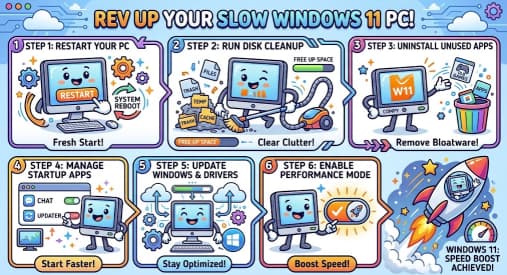
How to Run Windows 11 Smoothly on a 5- or 7-Year-Old Laptop/PC

Step-by-Step Optimizations for Low-Spec or Aging Hardware If you are using an older laptop or desktop from around 2017 to 2019 you may have asked whether Windows 11 can run smoothly on your device. Good… 

How to Set Up Remote Desktop on Windows 11? A Beginner’s Guide

In remote work mode having the ability to access your PC from anywhere is very useful and important to have. Whether you need to reach important files, manage apps or troubleshoot a device Remote Desktop… 

Fixing Wi-Fi Connection Problems Easily on Windows 11

Did it happen to you that while watching a movie or trying to join a meeting, or playing game online then you find Wi-Fi is not working. Although Windows 11 brings a modern look and… 

Telemetry in Windows 11: What It Is and Why It Matters for Your PC

Telemetry exists in Windows but with the release of Windows 11 it became more central to how the windows works. While the term “telemetry” may sound technical or even sophisticated to end users however the… 

How do I manage app permissions in Windows 11?

Definitely now is the most important time to start worrying about protecting your personal information as protecting this information is just as important as the hardware and software you use. With Windows 11, Microsoft introduced… 

How to Set Up Parental Controls with Microsoft Family Safety

The internet has become a big part of our daily lives. Children use computers, phones, and tablets for learning, entertainment, and communication. This is great—technology helps kids grow, learn new skills, and explore the world.… 

How to Enable Two-Factor Authentication (2FA) in Windows 11

Cybersecurity has become more important than ever. With so much of our work, personal communication, banking, and private information stored on our computers, simply having a password is no longer enough. Passwords can be guessed,… 

Configuring Windows Firewall for Maximum Safety

Windows computers are used everywhere—at home, in schools, and in businesses. Because they are connected to the internet, they face many security risks such as malware, hackers, and network attacks. One of the most important… 

Setting Up Ransomware Protection in Windows 11 – A Simple and Complete Guide

Ransomware is one of the most dangerous types of malware people face today. It locks your files and demands payment to release them. Many users think ransomware only affects businesses, but home computers are just… 

Understanding Windows 11 Security Features: A Shield for Your Digital Life

In today’s interconnected world, the security of your computer isn’t just a technical detail—it’s the digital foundation of your work, your memories, and your identity. With cyberattacks becoming more sophisticated, relying on old, basic security…