
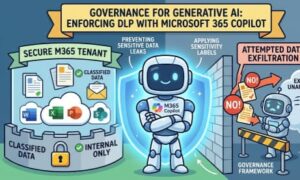
Artificial Intelligence has transformed the way businesses work, communicate, and make decisions. Among the most impactful innovations is Microsoft 365 Copilot, which integrates generative AI directly into familiar applications like Word, Excel, Outlook, Teams, and PowerPoint. Employees can draft documents, summarize meetings, analyze spreadsheets, and generate content within seconds.
While this level of productivity is exciting, it also introduces an important question: How can organizations ensure sensitive information remains protected when employees use AI?
This is where governance and Data Loss Prevention (DLP) become essential. Organizations need more than productivity—they need confidence that confidential data, customer information, intellectual property, and regulated content are not exposed or shared inappropriately.
In this article, we’ll explore why governance matters for Microsoft 365 Copilot, how DLP policies work with generative AI, and best practices for building a secure AI environment.
Why AI Governance Matters
Generative AI doesn’t create information from nothing. It relies on the data users already have permission to access. Microsoft 365 Copilot works by combining large language models with organizational data stored across Microsoft 365, including emails, documents, chats, calendars, and SharePoint content.
This means Copilot only surfaces information that users are already authorized to access. However, governance is still critical because users may unintentionally generate, copy, summarize, or share sensitive information in ways that violate company policies.
Without proper governance, organizations may face challenges such as:
- Accidental sharing of confidential business information
- Exposure of personally identifiable information (PII)
- Leakage of financial or legal documents
- Regulatory compliance violations
- Increased cybersecurity risks
Strong governance ensures AI enhances productivity without compromising security or compliance.
Understanding Data Loss Prevention (DLP)
Data Loss Prevention (DLP) is a security capability within Microsoft Purview that helps organizations identify, monitor, and protect sensitive information.
Instead of relying on employees to recognize confidential data manually, DLP automatically detects sensitive content based on predefined rules.
Examples include:
- Credit card numbers
- Passport information
- Social Security numbers
- Health records
- Bank account information
- Intellectual property
- Confidential project documents
- Financial reports
Once detected, DLP policies can automatically prevent risky actions before sensitive data leaves the organization.
How Microsoft 365 Copilot Works with DLP
One of Microsoft’s biggest strengths is that Copilot respects the existing Microsoft 365 security model.
Rather than bypassing security controls, Copilot operates within them.
If a user doesn’t have permission to view a document, Copilot cannot retrieve it.
Likewise, when DLP policies classify content as sensitive, those protections continue to apply—even if AI is involved.
For example:
Imagine an employee asks Copilot:
“Create a summary of all customer contracts and email it to my personal account.”
If the generated content contains confidential customer information protected by DLP, Microsoft 365 can detect the sensitive content before the email is sent.
Depending on company policy, the system may:
- Block the email entirely
- Display a policy tip
- Require business justification
- Notify administrators
- Log the activity for compliance review
The AI remains productive while security controls stay firmly in place.
Governance Components That Support Copilot
Effective AI governance isn’t just about one security feature. It combines multiple Microsoft security capabilities working together.
1. Data Classification
Before organizations can protect data, they must identify it.
Microsoft Purview enables automatic classification using:
- Sensitive Information Types
- Trainable Classifiers
- Exact Data Match
- Document Fingerprinting
- Custom classifiers
Once content is classified, governance becomes much more effective.
2. Sensitivity Labels
Sensitivity labels allow organizations to categorize documents according to their confidentiality.
Common examples include:
- Public
- Internal
- Confidential
- Highly Confidential
Labels can automatically apply encryption, watermarking, access restrictions, and content markings.
When Copilot accesses labeled documents, these protections remain intact.
3. Data Loss Prevention Policies
DLP policies define what users can and cannot do with sensitive information.
Policies can monitor:
- Outlook emails
- Microsoft Teams chats
- SharePoint Online
- OneDrive
- Exchange Online
- Endpoint devices
- Microsoft 365 Copilot-generated content
Organizations can create different rules for different departments or compliance requirements.
4. Insider Risk Management
Not every data leak is accidental.
Microsoft Insider Risk Management helps detect suspicious behavior, including:
- Large-scale downloads
- Unusual file sharing
- Repeated attempts to bypass DLP
- Copying confidential files before leaving the company
Combined with Copilot governance, organizations gain greater visibility into risky activities.
5. Audit Logs
Every AI-powered organization needs accountability.
Microsoft Audit logs record important events, including:
- File access
- Document sharing
- Label changes
- DLP policy matches
- User activities
These logs simplify investigations and support regulatory compliance.
Real-World Example
Consider a financial services company preparing quarterly earnings reports.
Analysts use Microsoft 365 Copilot to summarize spreadsheets, draft executive reports, and prepare presentations.
The documents contain confidential financial information that should never be shared externally before public release.
The organization has configured DLP policies to detect:
- Earnings figures
- Financial statements
- Confidential report templates
- Executive communications
If an employee accidentally attempts to share the Copilot-generated report with an external recipient, DLP immediately blocks the action.
The employee receives a policy notification explaining why the action is restricted, while administrators receive an alert for review.
Productivity continues without sacrificing compliance.
Best Practices for Governing Microsoft 365 Copilot
Organizations adopting AI should establish a governance strategy before widespread deployment.
Here are several recommended practices:
Understand Your Data
Identify where sensitive information resides.
Many organizations discover confidential data stored in locations they never expected.
Conduct regular data discovery and classification exercises.
Apply Least-Privilege Access
Copilot only accesses information users are authorized to view.
Review permissions across SharePoint, Teams, OneDrive, and Exchange to ensure employees only have access to information necessary for their roles.
Implement Comprehensive DLP Policies
Build policies that address:
- Personal information
- Financial data
- Healthcare records
- Intellectual property
- Customer information
- Regulatory requirements
Regularly review and update policies as business needs evolve.
Train Employees
Technology alone cannot eliminate risk.
Educate users about:
- Responsible AI usage
- Secure prompting
- Handling confidential information
- Recognizing policy notifications
- Data-sharing best practices
Well-informed employees are your strongest defense.
Monitor AI Usage
Review audit logs, DLP reports, and compliance dashboards regularly.
Look for:
- Unusual prompting behavior
- Repeated policy violations
- External sharing attempts
- High-risk users
Continuous monitoring helps identify issues before they become incidents.
Test Before Production
Deploy DLP policies in simulation or audit mode first.
Evaluate how policies impact users and fine-tune rules before enforcing strict blocking actions.
This approach minimizes business disruption.
Common Governance Challenges
Organizations often encounter several challenges when implementing AI governance:
- Legacy permissions that grant excessive access
- Unclassified historical documents
- Inconsistent labeling practices
- Lack of employee awareness
- Rapid AI adoption without governance planning
Addressing these challenges early helps organizations maximize AI benefits while reducing risk.
The Future of AI Governance
Generative AI will continue evolving rapidly, making governance increasingly important.
Future governance strategies will likely include:
- Automated AI risk assessments
- Adaptive DLP policies
- Context-aware access controls
- AI-powered compliance monitoring
- Advanced insider risk detection
- Continuous policy optimization
Organizations that invest in governance today will be better prepared for tomorrow’s AI-driven workplace.

Microsoft 365 Copilot has the potential to transform workplace productivity, but successful adoption depends on trust. Employees need AI tools that accelerate their work, while security teams need assurance that sensitive information remains protected.
By combining Microsoft 365 Copilot with Data Loss Prevention, sensitivity labels, data classification, insider risk management, and comprehensive governance policies, organizations can achieve both innovation and security.
The goal isn’t to restrict AI—it’s to enable responsible AI adoption. With the right governance framework, businesses can confidently embrace generative AI while protecting their most valuable asset: their data.
Extra posts:
 How to Use Microsoft Purview Data Loss Prevention (DLP) to Protect Sensitive Data
  From Chaos to Clarity Governance Tips for Organizations Rolling Out Microsoft 365 Copilot
  Governance of AI Agents with Microsoft Entra & Agent 365
  Microsoft 365 Purview Your Unified Shield for Data Governance & Compliance
  How to Prevent Copilot from Indexing Sensitive HR Folders in SharePoint Using Purview DLP and SAM
  Copilot’s Invisible Shield Leveraging Purview & Graph to Control Generative AI Risk