
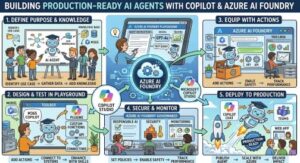
Building an AI agent that works in a demo is easier than building one that works reliably in production.
In a demo, the workflow is usually predictable. The input is clean, the API works, the data is available, and the user does exactly what the team expects.
Production is different.
Real users ask unexpected questions. Enterprise data is messy. APIs fail. Permissions change. Models sometimes produce incorrect outputs. Users abandon conversations halfway through a workflow. Costs can increase unexpectedly. And when an agent has permission to take action, a small mistake can become a serious business problem.
This is where platforms such as Microsoft Copilot and Azure AI Foundry can help. But simply creating an agent on a platform doesn’t make it production-ready.
The real goal is to build an agent that is reliable, secure, observable, testable, and governed from day one.
So how do you actually get there?
1. Start With a Clearly Defined Business Problem
One of the most common mistakes is starting with the technology.
Teams build an agent because they want an agent, rather than because they have a workflow that needs improvement.
Instead, start with a business process.
Ask:
- What task are we trying to automate?
- Who will use the agent?
- What decisions does it need to make?
- What information does it need?
- What actions should it be allowed to perform?
- Which actions require human approval?
- What happens when it doesn’t know the answer?
For example, instead of saying, “Let’s build an HR agent,” define something more specific:
“Build an employee-support copilot that answers HR policy questions using approved company documentation and escalates sensitive cases to HR.”
That definition immediately creates boundaries.
The agent isn’t expected to solve every HR problem. It has a specific responsibility.
Good agent design starts with a narrow scope and expands gradually.
2. Choose the Right Agent Architecture
Not every problem requires a fully autonomous agent.
Sometimes a deterministic workflow with an LLM inside it is a better solution.
For example:
User → Copilot → Agent → Knowledge Retrieval → Validation → Action → Human Approval
This approach gives the model flexibility where it is useful while keeping critical business logic under application control.
With Azure AI Foundry, teams can build and evaluate agent-based applications while integrating models, tools, data, and enterprise controls.
The important point is not to give the model complete control over the application.
Instead, think of the model as one component inside a larger system.
Your architecture should define what the model can decide and what the surrounding application must decide.
3. Ground the Agent With Trusted Enterprise Data
One of the biggest causes of poor AI experiences is unreliable information.
If your agent doesn’t have access to the right enterprise knowledge, it may generate an answer based on general model knowledge.
That’s where retrieval-augmented generation, or RAG, becomes important.
Instead of asking the model to remember company policies, retrieve the relevant information from approved sources and provide that information to the model at runtime.
For example:
User asks:
“What is our parental leave policy?”
The agent should retrieve the current HR policy rather than rely on what the model learned during training.
This improves accuracy and makes responses easier to verify.
However, RAG itself needs governance.
Your knowledge sources should be:
- Current
- Authoritative
- Permission-aware
- Properly indexed
- Regularly reviewed
- Clearly separated by business domain
The goal isn’t simply to give the agent more documents.
The goal is to give it the right information from the right source.
4. Control What Your Agent Can Do
This is one of the most important principles for production agents.
Don’t give an AI agent unlimited access to enterprise systems.
Create clearly defined tools.
For example:
GetCustomerProfileSearchOrdersCreateSupportTicketRequestRefundUpdateCustomerAddress
Each tool should have a specific purpose and controlled permissions.
An agent that can read customer information doesn’t necessarily need permission to modify it.
Likewise, an agent that can prepare a refund request may not need permission to approve the refund.
This follows a simple security principle:
Give the agent the minimum permissions required to complete its job.
For high-impact actions, add additional validation or human approval.
5. Use Guardrails Around Model Decisions
A model should not be the final authority for every business decision.
Suppose an agent wants to issue a $5,000 refund.
Instead of allowing the model to execute that action directly, your application can enforce a rule:
Refunds above $500 require human approval.
The agent can prepare the request, explain why it believes the refund is appropriate, and send it for approval.
This creates a safer architecture:
AI recommends → Business rules validate → Human approves → System executes
For low-risk actions, the workflow can be more automated.
For high-risk actions, increase the level of control.
This is how you make agent autonomy practical rather than dangerous.
6. Design for Failure From the Beginning
Production systems fail.
Your agent needs to know what to do when they do.
What happens if the CRM is unavailable?
What happens if a search returns no results?
What happens if the API times out?
What happens if the model produces an invalid response?
What happens if the user gives incomplete information?
Don’t leave these scenarios to chance.
Build explicit fallback paths.
For example:
Agent → API call → Timeout → Retry → Retry fails → Explain issue → Create support ticket
The agent should also have limits on retries and tool calls.
If an agent has been unable to complete a task after a defined number of attempts, it should stop rather than continue indefinitely.
A controlled failure is much better than an uncontrolled loop.
7. Evaluate Before You Deploy
One of the biggest differences between an AI prototype and a production AI application is evaluation.
Don’t just ask whether the agent “sounds good.”
Measure whether it actually performs the intended task.
Create a test dataset containing:
- Normal requests
- Ambiguous requests
- Incorrect information
- Incomplete information
- Difficult edge cases
- Security-related requests
- Out-of-scope questions
- Tool failures
- Permission failures
Then evaluate the agent against these scenarios.
You can measure things such as:
- Answer correctness
- Grounding
- Relevance
- Tool selection
- Task completion
- Safety
- Latency
- Cost
Azure AI Foundry provides capabilities for evaluating generative AI applications and agents, which makes evaluation an important part of the development lifecycle rather than something done manually at the end.
8. Monitor the Agent After Deployment
Deployment isn’t the finish line.
It’s the beginning of the real learning process.
You need visibility into what the agent is doing in production.
Monitor:
- User requests
- Agent responses
- Tool calls
- Failures
- Latency
- Token usage
- Costs
- Escalations
- Successful task completion
- User feedback
Observability is particularly important with agents because a final response doesn’t always explain what went wrong.
An agent might produce the wrong answer because it retrieved the wrong document, selected the wrong tool, received bad data, or misunderstood the user’s intent.
Without traces and useful telemetry, troubleshooting becomes guesswork.
9. Secure Your Copilot and Agent
Enterprise AI requires more than prompt-level security.
Think about identity, authorization, data access, secrets, APIs, logging, and governance.
Your Copilot or agent should respect the same access controls as the underlying business systems.
If an employee doesn’t have permission to see a particular customer record in the source system, the AI shouldn’t expose it simply because the employee asked through a conversational interface.
This is why identity-aware access and permission-aware retrieval are so important.
Also avoid putting secrets, passwords, API keys, or sensitive configuration directly into prompts or agent instructions.
Security needs to be part of the architecture, not an afterthought.
10. Control Cost and Latency
An intelligent agent can become expensive if every request triggers multiple model calls and tool executions.
For example:
User request → planning → retrieval → model call → tool call → validation → second model call → another tool call
That workflow may work technically, but it could become expensive and slow at scale.
Optimize where possible.
Use smaller models for simpler tasks when appropriate. Limit unnecessary context. Cache information when practical. Reduce redundant tool calls. Set reasonable token and execution limits.
And always measure the cost of completing a business task, not just the cost of an individual model call.
11. Introduce Human-in-the-Loop Where It Matters
The objective isn’t to remove humans from every workflow.
Sometimes the best AI system is one that knows when a human should take over.
Consider workflows involving:
- Financial decisions
- Legal matters
- Sensitive employee issues
- Security incidents
- High-value transactions
- Customer account changes
The agent can do the time-consuming work while the human remains responsible for the final decision.
This often provides a better balance between automation and control.
12. Treat Production as a Continuous Improvement Cycle
The best production agents aren’t finished after launch.
They evolve.
A useful lifecycle looks like this:
Build → Test → Evaluate → Deploy → Monitor → Learn → Improve → Evaluate Again
Every production failure can become a new test case.
Every user complaint can reveal a missing instruction.
Every incorrect retrieval can expose a knowledge-management problem.
Every unnecessary tool call can reveal an architectural optimization.
Over time, your evaluation dataset becomes one of your most valuable assets.

Building a Copilot or Azure AI Foundry agent that works in production isn’t primarily about finding the most powerful model.
It’s about engineering the entire system around the model.
You need clear business boundaries, trusted enterprise data, controlled tools, strong identity and permissions, guardrails, evaluation, observability, cost management, failure handling, and appropriate human oversight.
Most importantly, don’t try to make your agent autonomous on day one.
Start with a controlled workflow.
Prove that it is reliable.
Measure it.
Monitor it.
Then gradually increase its autonomy as your confidence grows.
The future of enterprise AI won’t be defined simply by who can build the smartest agent.
It will be defined by who can build an agent that employees can trust to do the right thing, understand when it is uncertain, fail safely when something goes wrong, and improve continuously in production.
That’s what turns a Copilot or AI agent from an impressive demo into a real enterprise application.
Extra posts:
 Copilot Studio vs Azure AI Agents: What Should You Use?
  Cost Optimization for Copilot and AI Agents on Azure
  Azure AI Studio / Azure AI Foundry A Powerful Platform for Generative AI
  Accelerating Enterprise AI Innovation with Azure AI Foundry
  Agent Optimizer in Foundry Agent Service: Building Smarter and More Efficient AI Agents
  Unlocking Innovation with Azure AI Foundry Agent Service