Skip to content

How to Use Copilot to Draft Messages and Announcements in Microsoft Teams

In the fast-paced world of business communication, clarity and speed matter. Teams collaborate across geographies, time zones, and tools—and one of the most common tasks is sending the right message or crafting an announcement that… 

Debugging and Testing Your Copilot Studio Bots Efficiently

When you build conversational agents using Copilot Studio, deploying them is only half the job. To deliver reliable and useful bots, you must invest time in testing and debugging—and do so efficiently. This guide walks… 

Free & Official Learning Resources for the GitHub Copilot Certification Exam

The GitHub Copilot Certification Exam is an exciting new way to prove your skills in using one of the most innovative AI tools for software development. Designed for developers, DevOps engineers, administrators, and technical leaders,… 

Understanding the GitHub Copilot Exam Blueprint Skills Measured & Topics Covered

The world of software development is rapidly evolving, especially with the rise of AI-assisted coding tools. One key certification that’s gained attention is the one for GitHub Copilot, the AI-pair programmer developed by GitHub (in… 

Turn Conversations into Reports Instantly with Copilot in Microsoft Teams

In today’s fast-paced workplace, teams spend a lot of time in chats and meetings — but too often the valuable information shared there ends up buried in a scroll of history, or forgotten after the… 

How to Ask AI Meeting Assistants the Right Questions During Meetings

In today’s fast-paced hybrid work world, tools like Microsoft 365 Copilot (often simply “Copilot”) that sit inside your meeting platform are dramatically changing how we interact in meetings. But having access to a powerful AI… 

Copilot and Viva Empowering Employee Engagement

In today’s rapidly evolving workplace—defined by hybrid teams, digital collaboration, and shifting employee expectations—organizations must rethink how they engage, empower, and retain talent. That’s where the combined power of Microsoft 365 Copilot and Microsoft Viva… 

How Educators Can Teach AI Literacy Using Copilot

In today’s rapidly evolving digital landscape, teaching students how to understand, use, and critically evaluate artificial intelligence (AI) isn’t optional — it’s essential. By adopting the lens of AI literacy, educators can empower learners not… 

Create Learning Journals with Copilot in OneNote

In today’s fast-paced world, continuous learning is not just an option—it’s a necessity. Whether you’re a student, a professional, or a lifelong learner, keeping track of what you learn and how you grow is crucial.… 

Using Copilot Studio with Dataverse: A Developer’s Guide

In today’s enterprise world, harnessing artificial intelligence to drive insights and respond to user questions is no longer optional — it’s essential. With Copilot Studio and Microsoft Dataverse, developers and makers can build intelligent agents… 

Understanding AI Prompts Writing Better Requests for Copilot

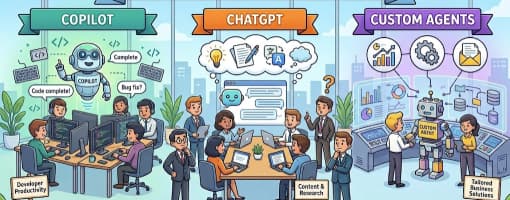
Artificial Intelligence (AI) has become a powerful ally for developers and content creators alike. Tools like GitHub Copilot and ChatGPT are revolutionizing how we write code, create documentation, and automate everyday tasks. Yet, one critical… 

Best Learning Paths to Master Copilot Skills

In today’s AI-enabled world, mastering tools like Microsoft 365 Copilot and GitHub Copilot opens up new productivity and creativity horizons. But simply “playing around” isn’t enough — you’ll benefit most from following a structured learning…